








- What is GPL?
GPL (General Public License) also known as GNU GPL, is the most used free software license. It was created by Richard Stallman for the GNU Project (Free Software Foundation).
It allows the software to be freely used, modified, and redistributed by anyone. WordPress is also Comes With the GPL license, which means that WordPress is open-source software that can be used, modified, and extended by anyone.
- What are GPL Themes or GPL Plugins?
GPL Theme or GPL Plugin is the exact same original wordpress product that licensed under General Public License. WordPress and all of its related products (themes, plugins, and templates) comes under GPL.
GPL (General Public License v3) gives everyone the ability to edit, modify, or even redistribute the code as everything is free and open source.
- How GPL Themes and Plugins Priced so low?
All WordPress items such as plugins and themes are licensed under the General Public License (GPL). This means that once we have purchased the item we are free to redistribute it if we choose to do so.
Your purchase to our site goes towards maintaining and buying new products to 3rd party theme and plugin authors. This form of crowd funding helps keep prices low and we can then pass this benefit on to you.
Our products don’t include premium support. That’s why we can offer up to 95% discounts on must-have commercial WordPress Themes and Plugins.
- What If my product doesn’t work? Do you provide refunds?
The nature of digital products means that once you have downloaded a plugin or theme, there’s no way to ‘return’ it. No refunds will be given except in the case when the digital product is completely unusable.
If the digital product is unusable, we need some time to try to fix it. Otherwise, we will make a refund. Our support team is available 24/7, if you have any questions or need help in installing or configuring digital products, please don’t hesitate to contact us.
- Are these GPL themes and plugins original?
The files that are available on Helping Blogger are 100% Original and Licensed under GPL. We even use GPL products on our site.
You’ll get untouched product files from us. We test each and every product before adding it to our database
- Are there any restrictions on the number of downloads?
There is no download limit on our yearly unlimited plan but have daily downloading limits on our monthly and yearly plan. Please check them about on our membership page.
- How long can I use the downloaded plugins & themes?
There is no time limit or validity. You can use gpl themes and gpl plugins as long as you want but we provide only 1 years of future updates.
- How often are new product updates released?
We usually add new products every day and publish new versions of the existing products.
Please note we do not update products immediately and do not provide any guarantee that the last version of each products will be added.
- Will I get the automatic updates?
GPL themes or plugins, won’t automatically update, as the license keys are pre stored inside the product file. If you want to update the product, you have to download it from our website and perform the update manually.
If you want to receive automatic updates you have to purchase the product directly from the developer.
- Will I get any support from the developer or from Helping Blogger?
No, the original developer does not provide support, and we don’t either.
We only offer basic help with installation and product updates.
- Can I request a new product or version of an outdated plugin or theme?
Yes, you can submit us your request and we are pleased to update for you as soon as possible. As long as the product comes under GPL license, we’ll try our best to add asap.
- How many sites can I use the same plugin or theme on?
As many as you like. The plugins and themes are GPL licensed so you can use them as often as you like on as many sites as you want.
- Error Fix - The package could not be installed. The theme is missing the style.css stylesheet?
If you see this error while installing a theme/plugin on your WordPress website then YOU HAVE TO EXTRACT THE ZIP FILE.
Sometimes we have to put multiple files and folders inside one file so we put them inside one zip file. Just extract the zip file, find the theme installable zip file, usually named as themename.zip and install it.
Installing a plugin in the theme section or a theme in the plugin section will cause this error too.
Note: Installable file extension for WordPress is ZIP. You’ll get the theme.zip file inside the main zip file or inside a theme folder.
If you still face any issues, feel free to contact us at contact@helpingblogger.com
- How to Install/Update WordPress Themes/Plugins?
">Click to watch Video Tutorial
Step 1: Purchase the product and download the ZIP file.
Note: Some ZIP files may need to be extracted before uploading.
If you are updating an existing theme or plugin, install the latest version and WordPress will automatically replace the older one. All your existing settings and customisation will remain unchanged.
Step 2: From your WordPress dashboard, go to Appearance → Themes if you’re installing a theme, or navigate to Plugins if you’re installing a plugin.
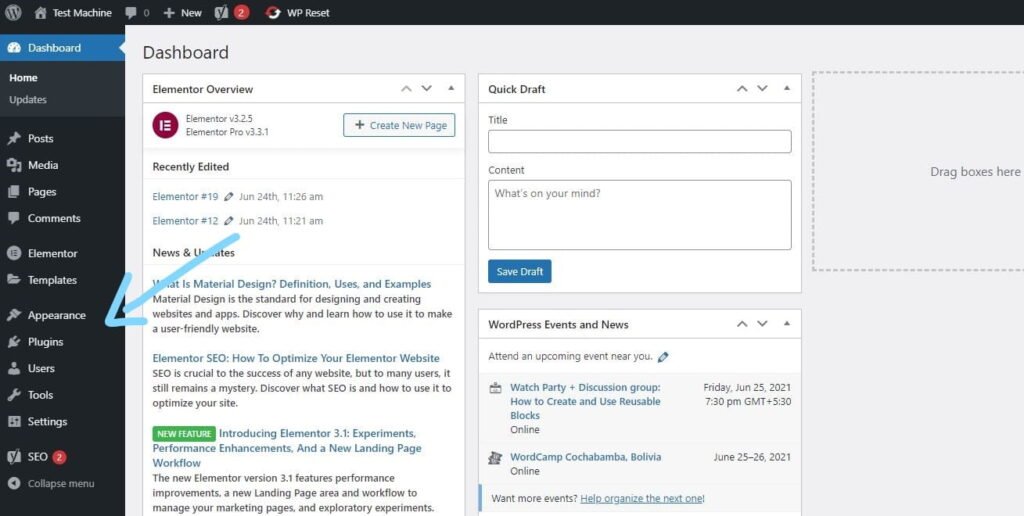
Step 3: Click the “Add New” button (this option is the same for both themes and plugins).
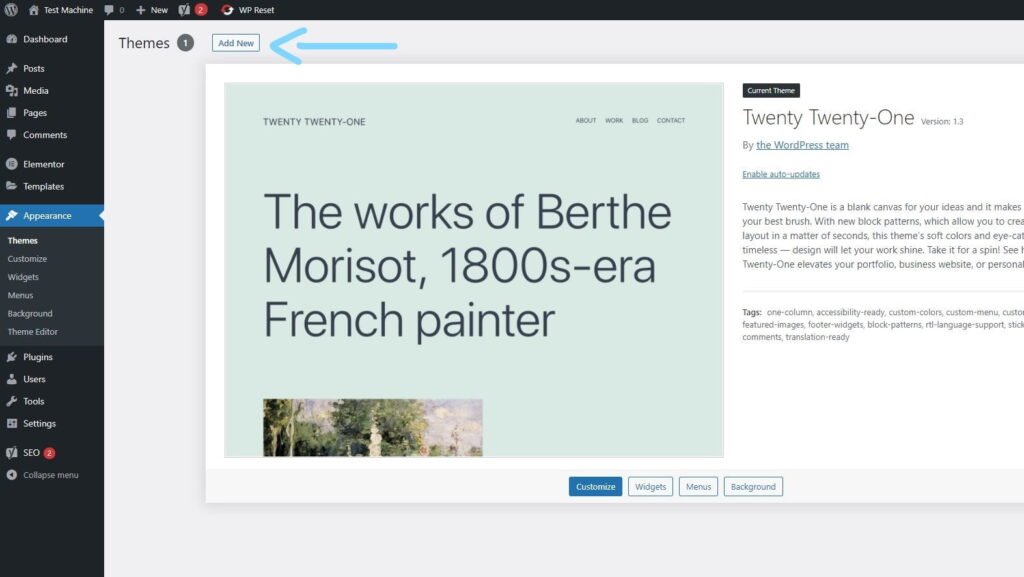
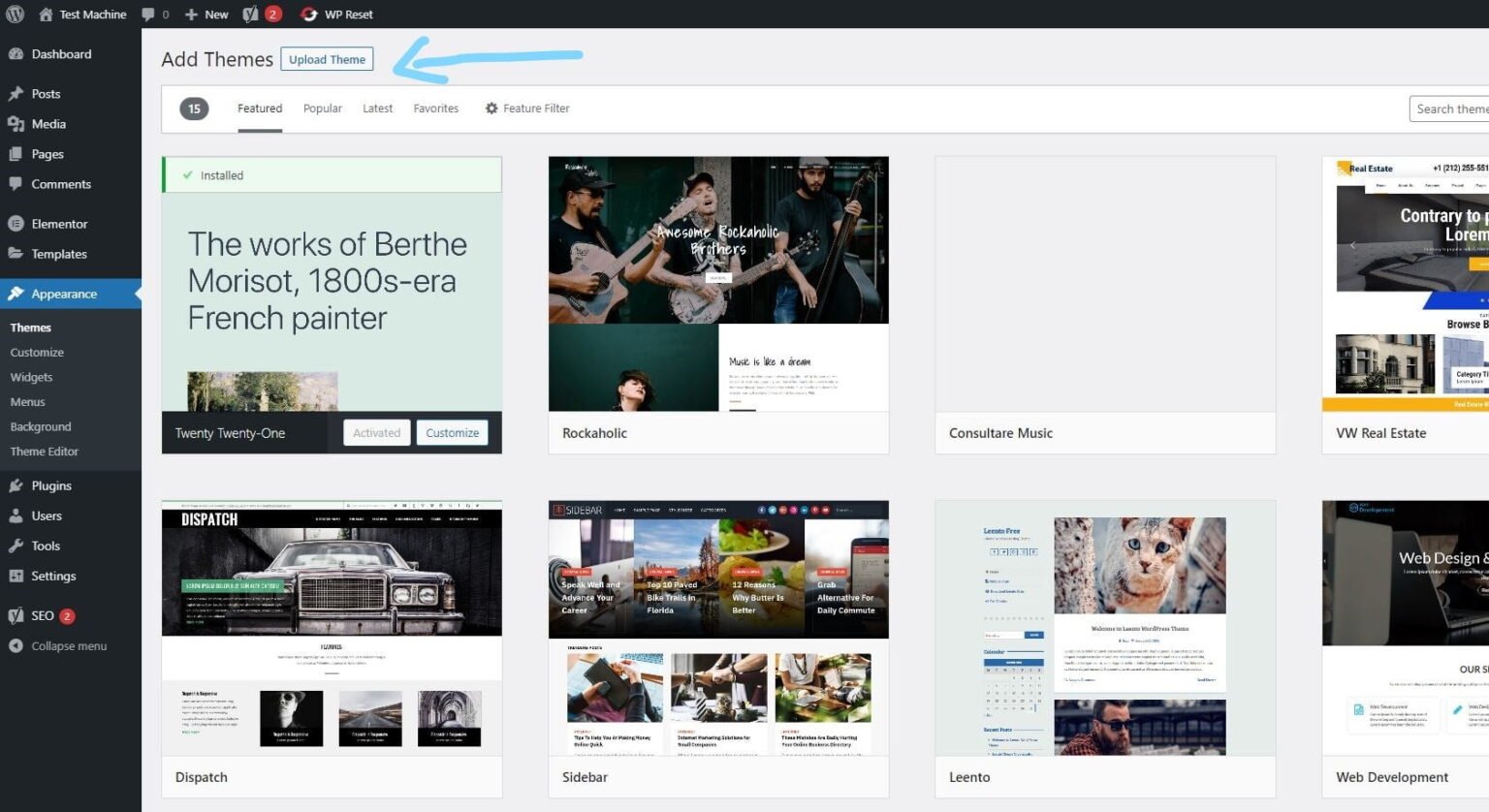
Step 4: Click “Upload Theme” if you’re installing a theme, or “Upload Plugin” if you’re in the plugins section.
Step 5: Click “Choose File” and select the ZIP file of the theme or plugin you want to install.
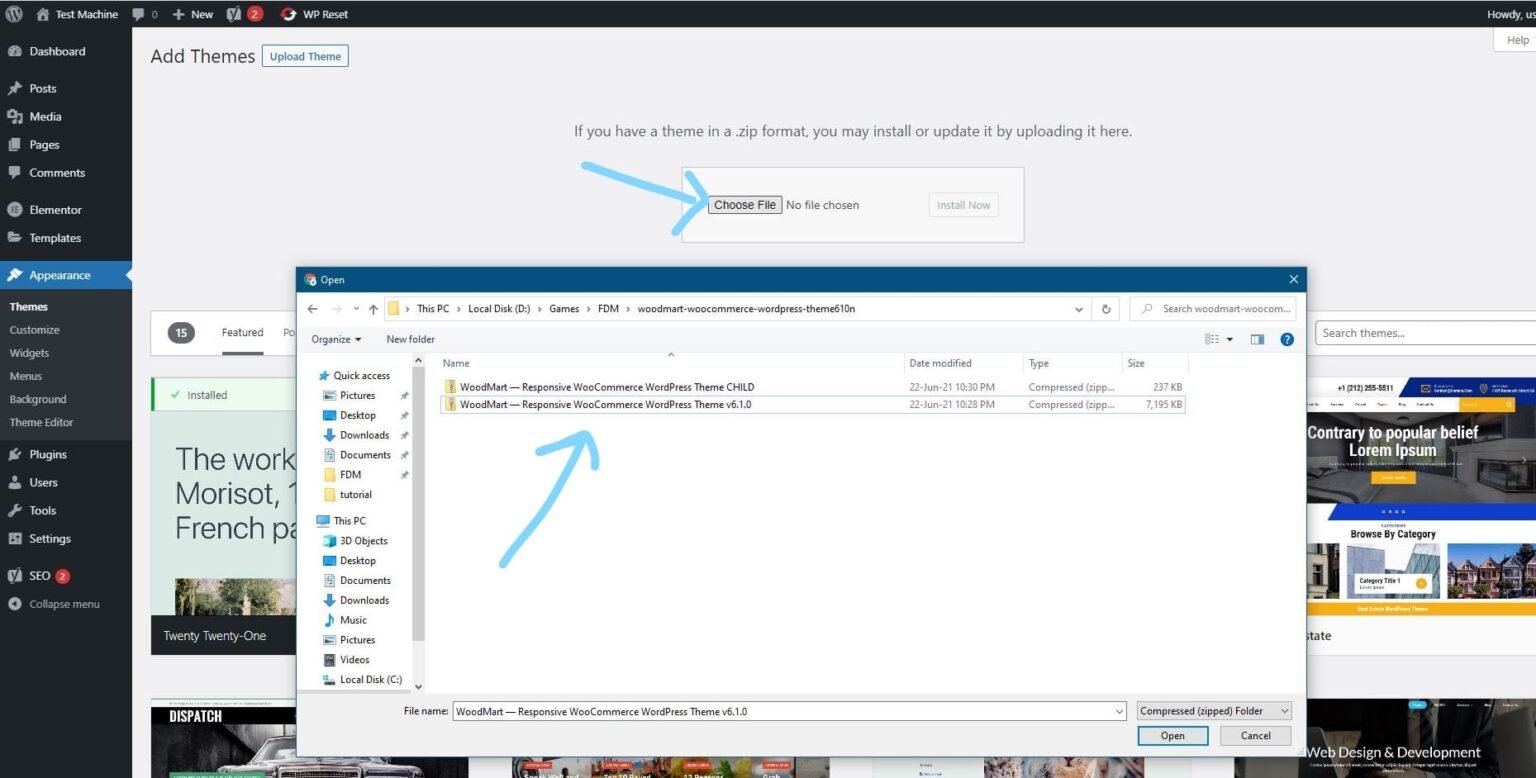
Step 6: Click “Install Now.”
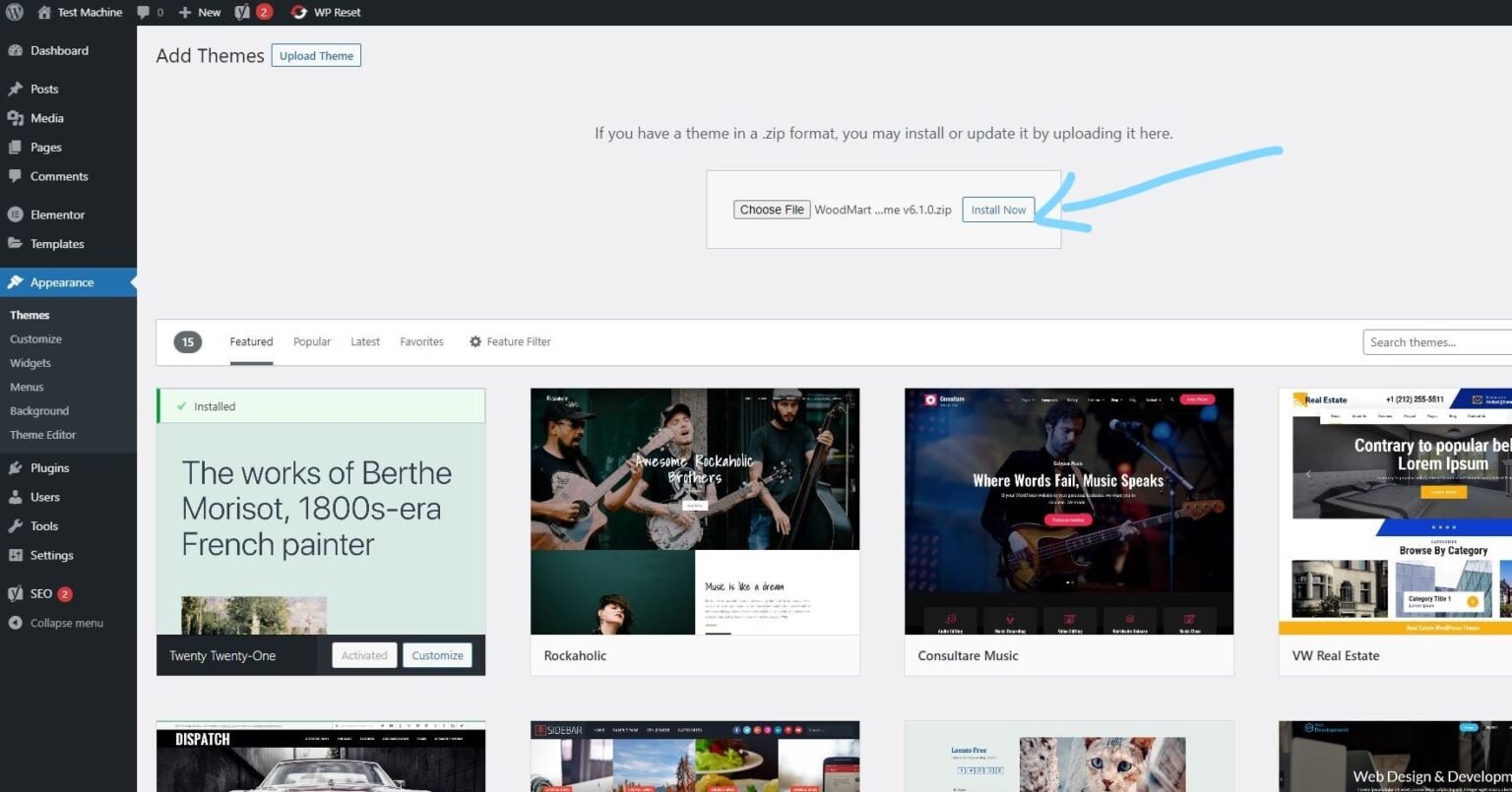
Step 7: The installation process will take a few seconds to complete.
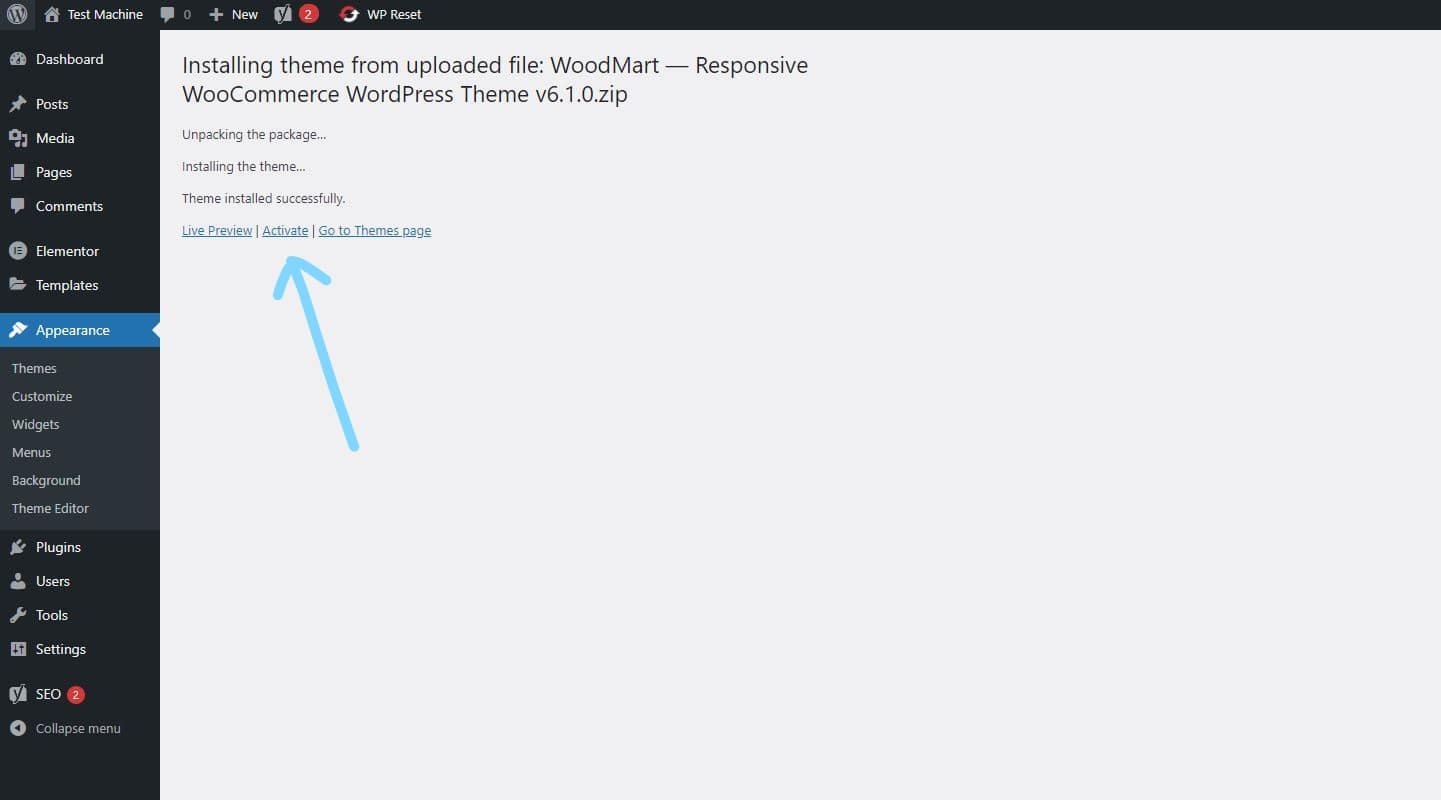
Step 8: Once the installation is complete, click “Activate” to manually activate your WordPress product.
">Click to watch Video Tutorial
- How to Install Elementor Template Kits?
Step 1: Download your template kit ZIP file. Do not unzip it.
Step 2: In WordPress, go to Settings → Permalinks and make sure Post Name is selected, then click Save.
Step 3: Navigate to Appearance → Themes → Add New and ensure Hello Elementor is installed and activated.
Step 4: If the theme prompts you to install the Elementor Page Builder plugin, click Install and then Activate.
Step 5: Go to Elementor → Settings, click the Features tab, and ensure the Flexbox Container shows a green icon. If not, set it to Active.
Step 6: Navigate to Plugins → Add New, search for Envato, and install and activate the Envato Elements – Photos & Elementor Templates plugin.
Note: If your kit requires Elementor Pro, make sure it is installed before continuing.
Step 7: Go to Elements → Installed Kits and click Upload Template Kit ZIP File. Your templates will now appear.
Step 8: Look for the orange banner at the top of the screen and click Install Requirements to load the necessary kit addons and settings.
That’s it! You’re now ready to start building your site.
Imported templates are stored in Elementor → Templates → Saved Templates and must be inserted into a new page in WordPress before customisation.
Imported blocks, tabs, or slides are also stored under Templates → Saved Templates and can be duplicated and customized directly.
Elementor Pro site parts are stored under Templates → Theme Builder and can be customized directly.
For detailed, step-by-step instructions with screenshots, copy and open the link below in a new tab.
How to Upload Install Elementor Template Kits from Themeforest to WordPress
The Best Digital WooCommerce Marketplace
Helping Blogger is one of the best marketplace for wordpress themes & plugins
Featured Items
These products are extraordinary
-
Astra Pro v4.11.12 – WordPress Theme Addon – Plugin
₹ 4,425.00Original price was: ₹ 4,425.00.₹ 299.00Current price is: ₹ 299.00. Add to cartAdd to WishlistAdd to Wishlist -
Avada v7.12.2 – Responsive Multi-Purpose WordPress Theme
₹ 4,425.00Original price was: ₹ 4,425.00.₹ 299.00Current price is: ₹ 299.00. Add to cartAdd to WishlistAdd to Wishlist -
Elementor Pro v4.1.1 – WordPress Page Builder + Elementor 5500+ Template Kits
Rated 3.33 out of 5₹ 3,500.00Original price was: ₹ 3,500.00.₹ 299.00Current price is: ₹ 299.00. Add to cartAdd to WishlistAdd to Wishlist -
Flatsome v3.20.4 – Multi-Purpose Responsive Theme
₹ 4,425.00Original price was: ₹ 4,425.00.₹ 299.00Current price is: ₹ 299.00. Add to cartAdd to WishlistAdd to Wishlist -
GP Premium v2.5.5 – GeneratePress WordPress Theme Addon
₹ 4,425.00Original price was: ₹ 4,425.00.₹ 299.00Current price is: ₹ 299.00. Add to cartAdd to WishlistAdd to Wishlist -
Newspaper v12.7.3 – News & WooCommerce WordPress Theme
₹ 4,425.00Original price was: ₹ 4,425.00.₹ 299.00Current price is: ₹ 299.00. Add to cartAdd to WishlistAdd to Wishlist -
OceanWP Theme v4.1.4 + All Addons (Core Extensions Bundle)
₹ 7,999.00Original price was: ₹ 7,999.00.₹ 299.00Current price is: ₹ 299.00. Add to cartAdd to WishlistAdd to Wishlist -
Rank Math Pro v3.0.103 – WordPress Plugin
₹ 4,200.00Original price was: ₹ 4,200.00.₹ 299.00Current price is: ₹ 299.00. Add to cartAdd to WishlistAdd to Wishlist
Why you choose us?
Simplified Pricing
We are selling WordPress gpl themes and gpl plugins at the lowest price ever. You can get our products as low as ₹299.00
Legal Downloads
All the GPL product files available on “Helping Blogger” are perfectly legal and licensed under the “general public license”.
100% Original GPL Themes & Plugins
All the premium wordpress themes and plugins files available on our website are 100% original and untouched/unmodified.
Verified by McAfee Secure
All our products are scanned and verified by McAfee Secure. This means that all of our products are 100% virus-free.
Unlimited Usage
Yes, you read it right. You can use these products on unlimited websites without any restrictions.
Instant Download
Download the latest versions of premium wordpress plugins and themes after payment without waiting, Instantly.
Regular Updates
We provide regular & latest updates for all available products. We provide 1 year of updates for single purchased products. Members will also get 1 year of updates with 10 downloads per file only.
Serious Discounts
Providing over 95% discount to all our wordpress premium themes and plugins.
Safe & Secure Payments
For payments we use Razorpay and Paypal, both are secured online payment gateways. You can pay via UPI, Wallets, Netbanking, Debit or Credit Cards.
FAQs
We understand what you want
Secure Payments
We use Stripe and Razorpay gateways.
Instant Delivery
Instant delivery within few seconds.
Instant Refund
Instant refund if our product doesn't work.
Fast Support
We will try to resolve your issue within 12 hours.